Decision-Centered COP

See the picture. Trust the picture.
Explain every decision.

Orden Watch is a decision-centered common operating picture for the SOF enterprise: the geospatial, temporal, and network view; calibrated-trust symbology; explainable-AI presentation; and a watch-floor decision workspace. It does not build its own ingest, model runtime, agent framework, governance, audit, learning loop, or deployment fabric. All of that already exists in Orden Agentic, and Watch consumes it.

One Engine
Every sensemaker and cue runs on Orden Agentic
DDIL
Air-gapped, offline-capable
Glass-box
Explainability on every dot
Why Orden Watch

The design rule: if the engine already does it, Watch surfaces it

Watch only builds what a decision-centered COP needs that Orden Agentic does not already provide: the operator experience, the geospatial-temporal-network visualization, and the trust presentation. That means the strategic payoff is an unarguable answer to "where does the AI actually run": it runs in Orden Agentic, inside your boundary, on models you control.

An Experience Layer, Not a New Engine

Watch consumes Agentic's ingest, orchestration, automation, governance, audit, learning, and deployment primitives instead of rebuilding them. Small to build, fast to field.

  • A sensemaker is an Agentic workflow, not new code
  • A cue with a human gate is a checkpoint node
  • DDIL and air-gap operation is Agentic's sovereign runtime
  • Continuous learning is Agentic's feed-forward memory

Trust You Can See, Not Just a Score

Trust is treated as an engineered, evidence-calibrated property and encoded visually: classification, uncertainty, pedigree, and recency at a glance, colorblind-safe by default.

  • Classification maps to color, confidence to opacity
  • Recency maps to size and exponential fade
  • Driven per-layer, editable in-COP, saved to config
  • MIL-STD-2525C / APP-6 symbology built in

Glass-Box Explainability on Every Dot

Click any track and see the exact run, node, cost, tokens, and causal reasoning that produced it. Explainability is a rendering of the engine's audit trail, not a separate XAI system bolted on.

  • Deep-link into the workflow editor from any feature
  • Counterfactual re-run compares a changed input side by side
  • Ensemble disagreement is preserved and shown, not averaged
  • Provenance stamped on every feature, every alert, every case item
The Signature Surface

An operator-grade 3D common operating picture

A saved, duplicatable, shareable, publishable geospatial document, not one global map. Offline by design, so the picture renders even with no network tiles and no internet connection.

3D/2D Geospatial Globe

Lazy-loaded so non-Watch users never download the extra weight. Renders on a bundled offline basemap with no token and no network tiles for a DDIL baseline.

Saved & Shareable COPs

A gallery of My COPs, Shared, and Published, with favorites, search, duplicate, and export/import, modeled on the platform's dashboard, not a single fixed map.

Live Analytic Overlays

H3-grid, heatmap, spatial-cluster, and ML risk outputs render as graduated choropleths and heatmaps automatically, using the layer's own color ramp.

Predicted Positions

Per-layer dead-reckoning: each track projects along its course and speed to a chosen horizon as a dashed ghost line, in sync with the timeline.
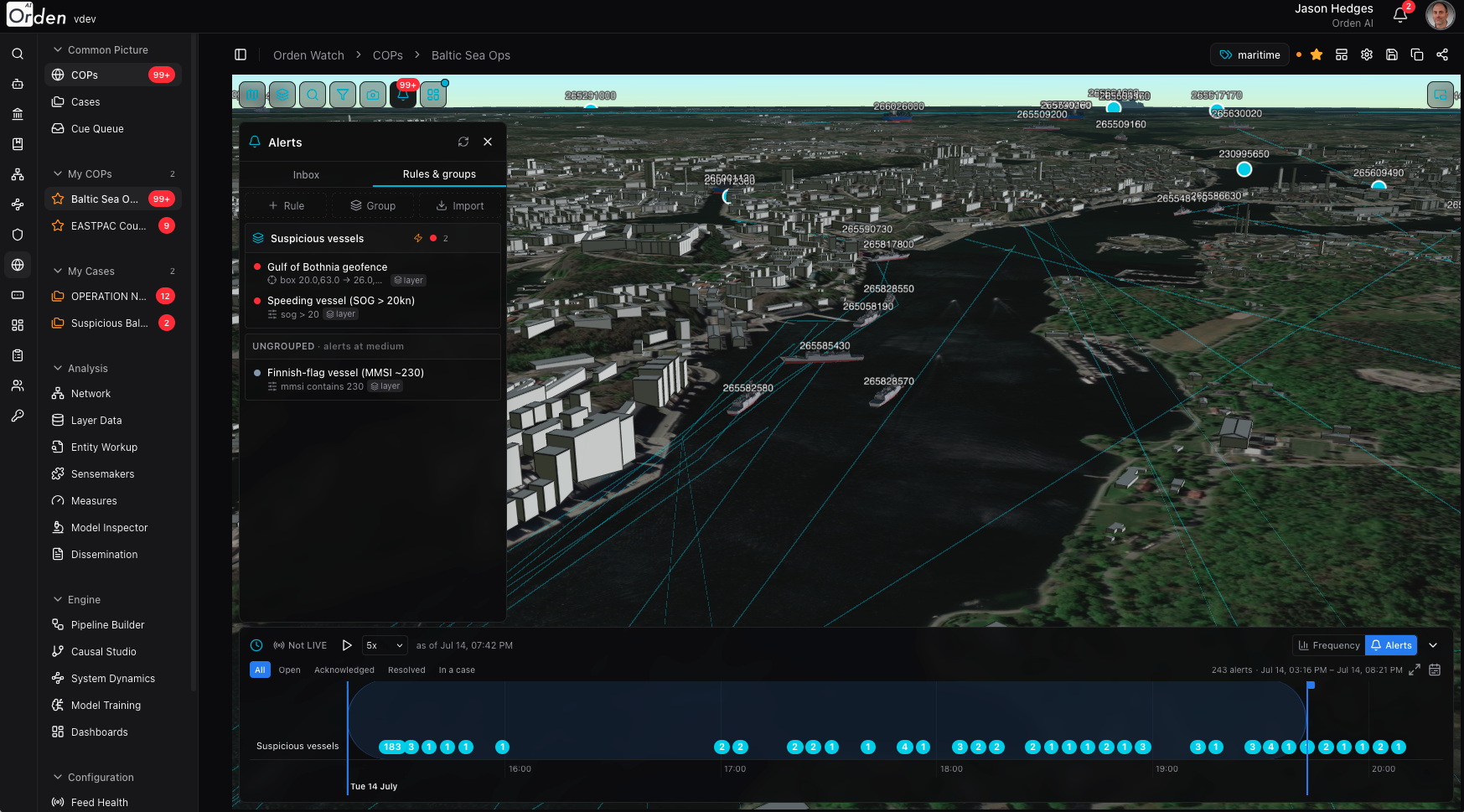
3D common operating picture with live AIS vessel tracking and the Alerts panel open

A live maritime COP: 3D globe, AIS tracks, and the Alerts panel side by side

Calibrated-Trust Symbology

Trust encoded visually, not asserted as a score

A single confidence number tells an operator nothing about why to trust it. Watch encodes classification, confidence, and recency directly into the symbol on the map, driven per-layer and editable without leaving the COP.

Classification, Confidence, Recency

Classification maps to a colorblind-safe color, confidence to opacity, and recency to size plus exponential fade, attribute-driven and saved to the COP's config.

MIL-STD-2525C / APP-6 Tactical Symbology

Affiliation frames and battle-dimension shaping for the full warfighting point-symbol set, with per-feature function-ID lookup so the glyph reflects what the track actually is.

Attribute-Driven Rules

Heading, tint, conditional visibility, zoom-range display, and persistent per-feature track lines, all bound by attribute rule rather than hand-placed per feature.

Trust Symbology

Classification → color. Confidence → opacity. Recency → size and fade. Colorblind-safe, editable in-COP.

Temporal Timeline & Replay

Forensic replay over the full recorded history

A timeline scrubber acts as the master "as-of" clock for the entire picture, driving every layer without rebuilding the viewer, backed by a full feature-history store, not just what happens to be on screen.

Server-Driven Playback

Drag a time window for series and tracks, or a bare playhead for state-as-of. Playback runs at 1x through 25x, pulling after-action replay forward.

Breadcrumbs & Activity Histograms

Per-track breadcrumb trails and per-layer activity histograms, with zoom and pan of the time domain and rebinned axes.

Viewport-Filtered Loading

Only on-screen tracks load, refetched as the operator pans and zooms, debounced and dateline-safe; the picture stays responsive at any scale.

Timeline as Master Clock

One scrubber drives the map, the alerts, and the case view. Play back the entire mission, not just the current snapshot.

Explainable AI & Human-in-the-Loop

Every recommendation, traceable and gated

Human-in-the-loop is an Agentic checkpoint node, not a Watch invention: the Cue Queue is simply the operator inbox for it, and explainability is a rendering of the same glass-box run history that governs everything else on the platform.

"Why Is This Here?"

Click any track to open the producing run, its outcome score, the specific node's snapshot, the full per-node glass-box list, and a deep-link into the workflow editor.

Counterfactual Re-Run

Re-run the workflow with a changed input or a per-node override, no graph edit required, and compare the new run against the baseline side by side.

Cue Queue with Auto-Approval

Pending decisions show the AI's recommendation, confidence, reasoning, and citations inline. Confidence above an explicit policy line auto-approves; everything below routes to a human.

Glass-Box on Every Dot

Run, node, cost, tokens, causal reasoning. Nothing on the map is an unexplained black box.

Your Agents, Your Rules

Bring the agents you've already built

A sensemaker isn't a fixed model Orden shipped. It's any agent or workflow built on Orden Agentic, with its own charter, toolset, autonomy dial, and budget. Build a custom agent for your mission, govern it exactly the way you govern every other agent on the platform, and put it to work inside Watch without a separate integration.

Any Agent Becomes a Sensemaker

Publish a workflow or point Watch at an existing agent, and it's immediately available as a sensemaker or an alert responder: the same agent object, charter, and toolset you already built.

Customize the Model, Not Just the Prompt

Swap in your own fine-tuned model, add domain-specific tools, or wire in a custom API. An ensemble is just an agent's tool allowlist, so customization happens at the agent level, not a Watch-specific settings screen.

Governance Carries Over, Unchanged

The autonomy dial, budgets, and kill switch that govern an agent everywhere else on the platform govern it here too. A sensemaker that's over budget or outside its policy stops the same way any agent would.

Disagreement, Not a Single Vote

An ensemble runs several agents against the same question and shows every vote and the agreement summary: consensus or dissent, never silently averaged into one number.

Sensemaking & Analysis

From raw feed to decision-ready analysis

Model-agnostic sensemaking, entity-relationship analysis, alerting that turns visible into actionable, and a full agentic case workbench for the analyst who has to write it all up.

Sensemakers & Ensembles

A sensemaker is a published Agentic workflow; "add a model" means publishing an operation. An ensemble binds several as an AI agent's tool allowlist, with each member's vote and agreement summary shown, disagreement preserved rather than averaged.

Network & Entity Workup

A force-directed link-analysis graph built from co-location patterns, shared identifiers, and declared ownership chains, plus a per-entity dossier with pedigree, connections, evidence, and an AI-generated narrative summary.

Alerting & Rules

Geofence, attribute, and detector-workflow rule types, grouped into severity-scored monitors with responder actions, a central rules library, and real-time push to every open COP.

Agentic Case Workbench

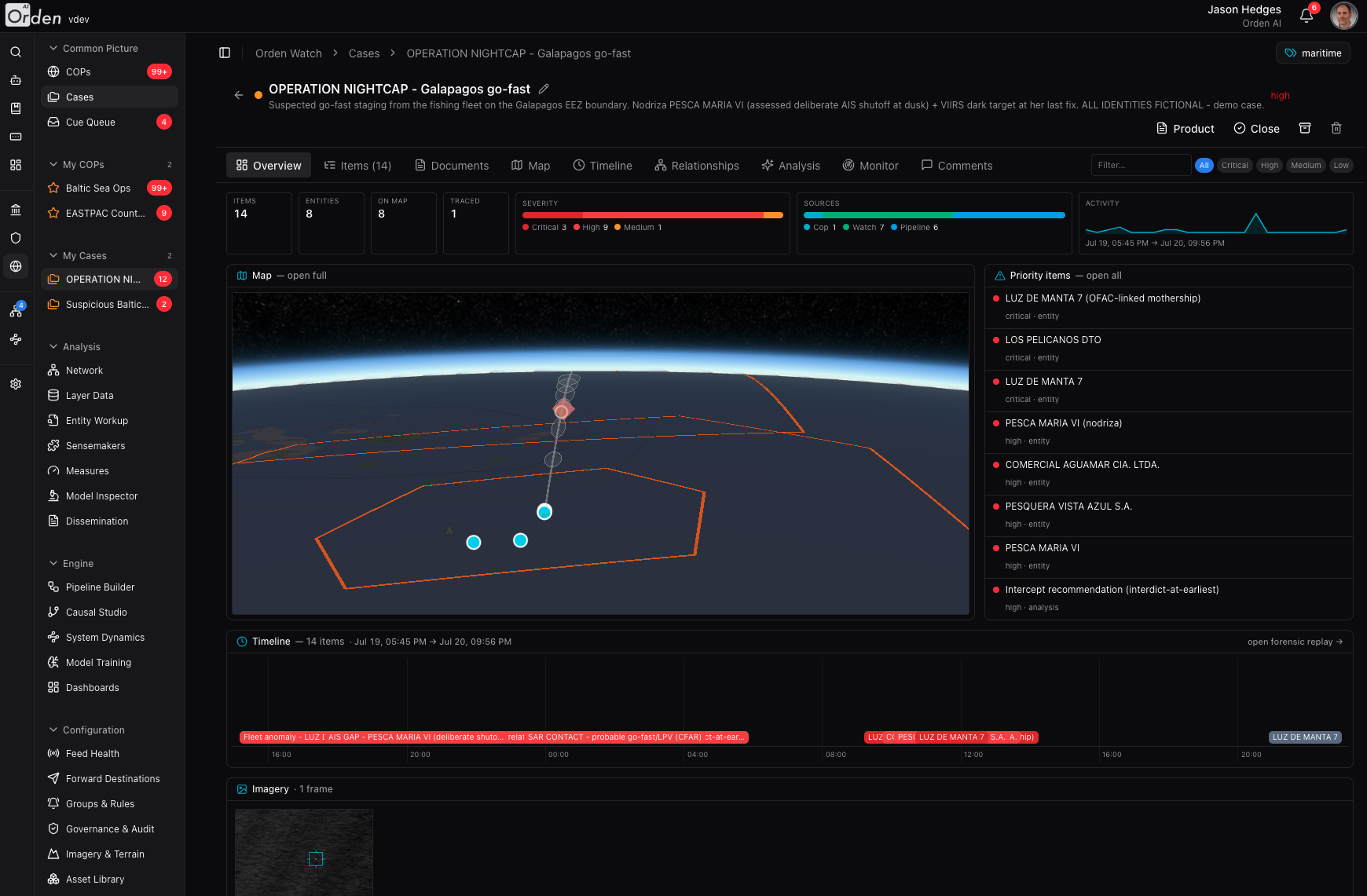
A full analyst workbench, not a passive item bucket: case map, timeline, relationships graph, AI-generated decision-ready analysis, case-scoped monitoring, and forwarding to named destinations.

Entity relationship graph: ownership, shared identifiers, and proximity links between vessels and companies

Relationships derived from the data itself: ownership, shared identifiers, and proximity, not just documents

Entity Workup dossier: AI-generated summary, pattern of life, consort partners, and related entities

A per-entity dossier: AI-generated summary, pattern of life, consort partners, and related entities

The Case Workbench

From a track on the map to a decision-ready case

A case starts wherever the analyst already is: select a track, an alert, or a layer, add it with a note, and the case workbench takes it from there, with a map, timeline, relationships, and an AI-generated analysis, all in one tabbed view.

Create a Case From Anywhere

Add a track, an alert, a whole layer, or a frozen slice of history straight from the COP with an analyst note. Snapshot the current map view into the case as evidence.

The Full Picture, Carried Over

Items keep the exact symbology they had on the source layer, plotted on a case map with feature search, an automatic legend, and a saved presentation the whole team opens to.

AI-Generated, Decision-Ready Analysis

A seeded analysis produces a summary, risk level, confidence, key entities, patterns, and recommended actions, plus any published decision-support model, run with case-prefilled parameters.

Monitor, Forward, Close the Loop

Stand up case-scoped alerting on the case's own entities or a geofence, forward items to a named destination, and thread comments with the team, torn down automatically when the case closes.

Case Overview: items, entities, severity, priority items, timeline, and imagery in one tabbed view

A case's Overview tab: items, entities, severity, priority items, timeline, and imagery, all in one place

Metrics on the Picture

Your KPIs live on the map, not in a separate tab

Operational awareness shouldn't require switching screens. Dashboard widgets drop directly onto the COP, and a live metrics ribbon tracks the mission without leaving the picture.

Widgets, Placed on the Map

Charts, gauges, and KPI tiles from the platform's dashboard stack drop directly onto the COP: draggable, resizable, and saved with it. Bind to a layer's own data with no configuration, or to any workflow.

A Live Measures Ribbon

Run volume, success rate, mean outcome score, latency, cost, and pending-decision load, tracked over a selectable window with a one-click drill into the runs behind the numbers.

Ground-Truth Imagery on the Globe

Upload a SAR or EO chip, place its footprint on the map, and it drapes into the picture like any other layer, served only through the platform, so imagery never leaves the boundary.

Dashboards on the Globe

Charts and KPI tiles floating over the map, plus a live measures ribbon: the mission picture and the mission metrics, in one view.

More Capabilities

Everything a decision-centered COP needs

Beyond the map, Orden Watch closes the full decision loop: ingest, sensemake, explain, cue, act, measure, learn.

Live Feeds

Any workflow becomes a live layer through streaming mode (MQTT, Kafka, or HTTP-poll), with per-layer feed-health chips and one-click resume/pause/stop, no kubectl required.

Self-Describing Workflow Contract

Any workflow becomes a COP layer, an alert rule, or a case-evidence filer with no bespoke wiring; several workflows can even merge into one continuous, dedupe-merged layer.

Dissemination & Learning

Markdown report products with classification banners, an AI report wizard that drafts a case-aware first draft, and after-action lessons curation linked back to the case they came from.

Governance & Audit

Every workflow run and every user action lands in the audit trail: status, trigger, actor, pinned version, score, cost, and a one-click glass-box replay.

Sovereign Deployment

The entire runtime, Watch and Agentic together, executes inside your boundary: on-premise, private cloud, or fully air-gapped, on an inference endpoint you control.

DDIL & Edge Survival

Suspend-and-resume agent state lives in the database and survives restarts. Distributed autoscaling queues and an offline geospatial baseline keep the picture alive at the edge.

Architecture

Built on Orden Agentic

Orden Watch is additive: a new route, a new module, and new tables layered onto the same runtime that runs every other workflow on the platform. The map is a rendering of real workflow execution, not a separate product with its own AI stack to maintain.

Sensemakers

  • Published operations with typed parameter contracts
  • Causal, system-dynamics, and ML workflows alike
  • Ensembles bind an allowlist via an AI agent node

The Map Contract

  • A map-output step turns any workflow into a COP layer
  • A detection step turns workflow logic into an alert rule
  • A case-filing step sends findings straight into a case

Explainability

  • Glass-box run history rendered as an operator view
  • Per-node snapshots, cost, tokens, and causal DAGs
  • Counterfactual re-run via config overrides, no graph edit

Governance

  • Checkpoint nodes power the Cue Queue
  • Tenant isolation enforced at the query layer
  • Sovereign, in-boundary, multi-tenant runtime
[ Get started ]

Ready to see Orden in action?

Schedule a personalized demo with our team and we'll show you exactly how Orden fits your use case.

Request a demo Contact sales